uBuntu NTP Server安裝與校時
Ubuntu 安裝ntp.service
1. 安裝NTP Service
sudo apt install ntp
2. 確認安裝
sntp --version
3. 設定NTP校正伺服器
進入ntp.conf檔
sudo nano /etc/ntp.conf
修改第21~24行,修改為: `tw.pool.ntp.org iburst`
# /etc/ntp.conf, configuration for ntpd; see ntp.conf(5) for help

driftfile /var/lib/ntp/ntp.drift

# Leap seconds definition provided by tzdata
leapfile /usr/share/zoneinfo/leap-seconds.list

# Enable this if you want statistics to be logged.
#statsdir /var/log/ntpstats/

statistics loopstats peerstats clockstats
filegen loopstats file loopstats type day enable
filegen peerstats file peerstats type day enable
filegen clockstats file clockstats type day enable

# Specify one or more NTP servers.

# Use servers from the NTP Pool Project. Approved by Ubuntu Technical Board
# on 2011-02-08 (LP: #104525). See http://www.pool.ntp.org/join.html for
# more information.
pool 0.tw.pool.ntp.org iburst
pool 1.tw.pool.ntp.org iburst
pool 2.tw.pool.ntp.org iburst
pool 3.tw.pool.ntp.org iburst

# Use Ubuntu's ntp server as a fallback.
pool ntp.ubuntu.com

# Access control configuration; see /usr/share/doc/ntp-doc/html/accopt.html for
# details.  The web page <http://support.ntp.org/bin/view/Support/AccessRestrictions>
# might also be helpful.
#
# Note that "restrict" applies to both servers and clients, so a configuration
# that might be intended to block requests from certain clients could also end
# up blocking replies from your own upstream servers.

# By default, exchange time with everybody, but don't allow configuration.
restrict -4 default kod notrap nomodify nopeer noquery limited
restrict -6 default kod notrap nomodify nopeer noquery limited

# Local users may interrogate the ntp server more closely.
restrict 127.0.0.1
restrict ::1

# Needed for adding pool entries
restrict source notrap nomodify noquery

# Clients from this (example!) subnet have unlimited access, but only if
# cryptographically authenticated.
#restrict 192.168.123.0 mask 255.255.255.0 notrust
4. 重新啟動ntp.service
sudo systemctl restart ntp.service
5. 查看系統時間
date -R
手動NTP校正時間
安裝ntpdate
sudo apt install ntpdate
手動校正時間
sudo ntpdate time.stdtime.gov.tw
架設自己的NTP Server
1. Server端設定流程
進入設定檔
sudo nano /etc/ntp.conf
找到 restrict 行,並進行修改。 這個配置允許 192.168.0.0/24 網段的所有設備可以訪問這個 NTP 伺服器。
restrict 192.168.0.0 mask 255.255.255.0 nomodify notrap
接著,重啟 NTP 服務
sudo systemctl restart ntp.service
2. Client端設定流程:
進入設定檔
sudo nano /etc/ntp.conf
找到 server 行,刪除或註釋掉它們(在行首加 #),然後添加一行以將 Da 的 IP 地址設為 NTP 伺服器,例如:
server 192.168.0.66 iburst
接著,重啟 NTP 服務
sudo systemctl restart ntp.service
時區設定
查詢當前時間
timedatectl
設定時區
sudo timedatectl set-timezone Asia/Taipei
問題紀錄:
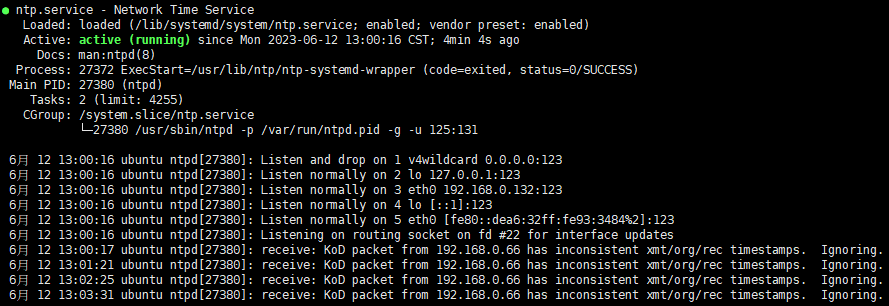
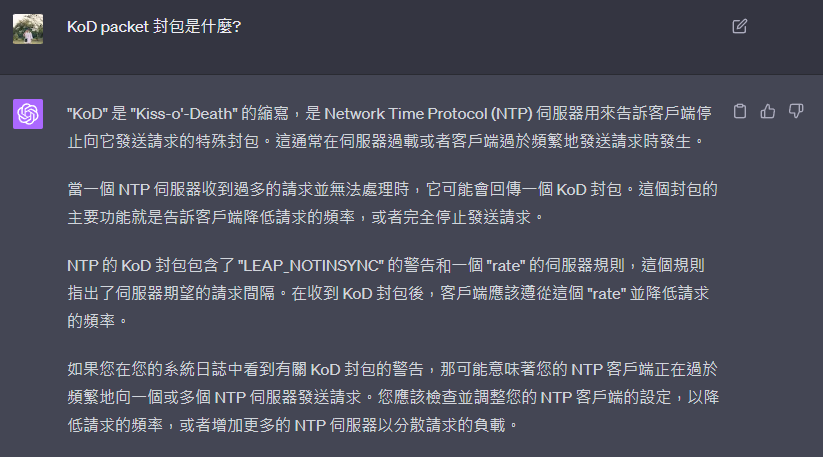
設定後,NTP Client端出現以下訊息:
receive: KoD packet from 192.168.0.100 has inconsistent xmt/org/rec timestamps. Ignoring